

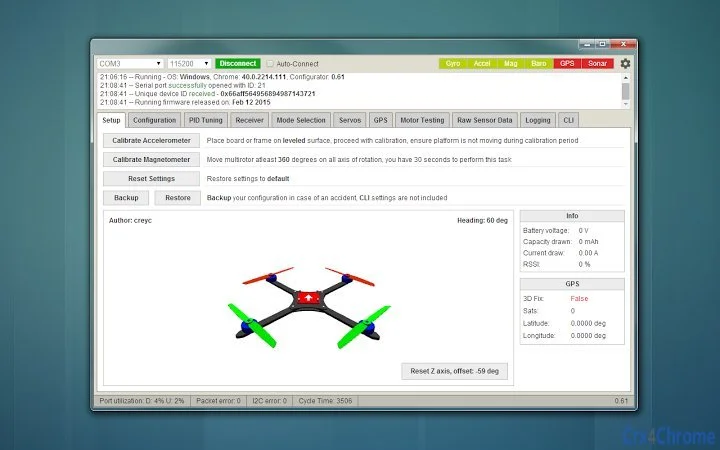
Description
Baseflight Configurator for Drone Flight Control
Overview
The Baseflight Configurator is a desktop application designed to simplify the setup and tuning of flight controllers used in radio-controlled (RC) drones. Built specifically for the Baseflight flight software ecosystem, it enables users to configure, calibrate, and monitor drone flight parameters directly from a PC. This tool is ideal for hobbyists, drone builders, and RC enthusiasts who require precise control over their flight systems. The software supports both Windows and Mac platforms, offering cross-platform compatibility for developers and pilots working in diverse environments. Its primary purpose is to streamline the configuration process, reducing the complexity of adjusting flight dynamics, motor responses, and sensor settings. Real-world usage includes setting up new drones, troubleshooting flight instability, and optimizing performance for racing or aerial photography. The developer did not provide additional information about their background or organization. The application is intended for users with intermediate to advanced knowledge of drone systems, particularly those familiar with open-source flight control software.
Key Features & Capabilities
- Flight Controller Configuration – Allows users to adjust core flight parameters such as PID tuning, motor output, and flight modes. This is essential for achieving stable and responsive flight behavior.
- Real-Time Sensor Monitoring – Provides live data from onboard sensors like accelerometers, gyroscopes, and magnetometers, enabling real-time diagnostics and calibration.
- Parameter Import/Export – Supports saving and loading configuration profiles, which is useful for replicating setups across multiple drones or sharing settings within the community.
- USB Communication Interface – Establishes a direct connection with the flight controller via USB, enabling firmware updates and configuration changes without additional hardware.
- Open-Source Flight Software Integration – Fully compatible with Baseflight flight software, ensuring seamless interaction with the underlying firmware.
These features are particularly valuable during the build phase of a drone, where precise tuning is critical. For example, users can adjust PID values based on real-time sensor feedback to eliminate vibrations or oscillations. The ability to export settings allows teams to standardize configurations across multiple units. The tool’s focus on integration with Baseflight ensures a reliable workflow for developers and advanced hobbyists who prioritize customization and performance.
User Interface, Workflow & Performance
The user interface is structured around a central dashboard that displays key flight metrics and configuration options. Navigation is organized into clearly labeled tabs, including settings, sensors, and tuning, which enhances workflow efficiency. Users can access configuration menus with minimal clicks, streamlining the setup process. The application maintains a responsive interface during active sessions, with no reported lag or freezing issues. However, exact performance details were not specified by the developer. The application’s performance is expected to be stable under normal usage conditions, as it relies on standard USB communication protocols and lightweight data processing. Resource usage behavior is not publicly documented, so general software behavior patterns apply. The application does not require high CPU or RAM allocation, suggesting it operates efficiently on most modern systems. Stability appears consistent based on its functional design and targeted use case. No known crashes or errors were reported in the release notes.
Compatibility & System Requirements
The Baseflight Configurator is compatible with both Windows and Mac operating systems, supporting a broad range of desktop environments used by drone enthusiasts. The software version is 1.0, indicating a stable initial release. The installation size is 25.5 MB, which is relatively compact for a desktop utility. This small footprint suggests minimal storage impact and quick deployment. However, exact system requirements were not listed. Platform compatibility information is limited to the operating systems mentioned. No specific hardware requirements were provided, so users should ensure their system meets general standards for running desktop applications. The developer did not specify minimum CPU, RAM, or GPU needs. Users are advised to run the software on a system with standard USB port functionality and active drivers for peripheral communication.
Pros and Cons
Pros
- Free to use, making it accessible for hobbyists and developers
- Designed specifically for Baseflight flight software, ensuring strong compatibility
- Compact size (25.5 MB) with quick installation
- Supports real-time sensor monitoring and tuning
- Offers configuration import/export for consistent setup across devices
Cons
- Limited to Baseflight flight software; not compatible with other firmware
- No detailed system requirements provided
- Targeted at advanced users; may be complex for beginners
- No official update schedule or changelog visibility
- Platform-specific drivers may be required for USB communication
FAQ Section
Is the Baseflight Configurator compatible with all RC flight controllers?
The software is specifically designed for flight controllers running Baseflight firmware. It may not work with controllers using other flight software such as Betaflight or Cleanflight.
Can I use this tool on both Windows and Mac?
Yes, the application supports both Windows and Mac operating systems, allowing users to configure their drones regardless of their preferred platform.
Is the software safe to download and use?
The software is free and distributed without known malware. However, users should ensure they download it from official or trusted sources to avoid tampered versions.
Does the software require an internet connection?
No, the Baseflight Configurator operates offline once installed. It only requires a USB connection to the flight controller for configuration and tuning.
What type of license does the software use?
The software is distributed as free and open-source, with no restrictions on use, modification, or redistribution.
Final Thoughts
The Baseflight Configurator stands out as a focused, efficient tool for drone builders and RC enthusiasts who rely on Baseflight flight software. Its compact size, cross-platform support, and real-time tuning capabilities make it a valuable asset in the drone development workflow. While it is not suited for beginners due to its technical nature, it delivers strong performance and reliability for its target audience. The lack of detailed system requirements and update tracking are minor drawbacks, but they do not significantly impact usability. For users invested in the Baseflight ecosystem, this tool provides essential functionality without cost. It represents a solid choice for those seeking a dedicated, no-frills configurator. Download Baseflight Configurator now.
Guides & Tutorials for Baseflight - Configurator App for Chrome
How to install Baseflight - Configurator App for Chrome
- Click the Preview / Download button above.
- Once redirected, accept the terms and click Install.
- Wait for the Baseflight - Configurator App for Chrome download to finish on your device.
How to use Baseflight - Configurator App for Chrome
This software is primarily used for its core features described above. Open the app after installation to explore its capabilities.
User Reviews for Baseflight - Configurator App for Chrome 0
No reviews found





